Skip to Content

Figma to WordPress Conversion Services

Turn your Figma designs into a fully functional, fast WordPress site, exactly as designed, built the right way, and ready to grow.

When Figma to WordPress Makes the Difference

Figma to WordPress conversion services make sense when the design is approved, but the site still needs to be built with the same level of care, structure, and consistency.

  • The design is ready, but development is stalled

    Design is approved, yet the project cannot move forward because the team lacks the time or WordPress capacity to build it.
  • New pages need to move faster

    When design moves faster than development, reusable WordPress sections can give editors a quicker way to launch new pages without rebuilding every layout.
  • The design needs to survive the handoff

    Your strong design can’t afford to lose details during development: spacing, typography, states, and responsive behavior need to be carried through into the live site.
  • The Figma file includes a full design system

    If the design already defines reusable components, it makes sense to carry that structure into WordPress so pages stay consistent and easier to manage.
  • You need a reliable delivery behind the scenes

    Client work must be built accurately, delivered on schedule, and handed back in a form the agency’s team can understand and continue.

Turn your inspirations into a performant WordPress site

Pain Points We Solve with Figma to WordPress Conversion Services

The Site Slinger turns the approved Figma design into a responsive, editable WordPress site with reusable sections, clear publishing controls, and a codebase built for ongoing use.
Layouts, spacing, typography, and states are checked against the Figma file across agreed screen sizes
Reusable Gutenberg blocks and page patterns let teams build new pages from approved sections
Performance, responsive behavior, and accessibility are addressed during development
Responsive behavior is reviewed early, agreed with the client, and tested before launch
WordPress Coding Standards and clear documentation give future developers a more workable foundation
The live site drifts from the approved design
Layouts, spacing, typography, and states are checked against the Figma file across agreed screen sizes
Editors depend on developers for every new page
Reusable Gutenberg blocks and page patterns let teams build new pages from approved sections
Pages look right but feel slow or difficult to use
Performance, responsive behavior, and accessibility are addressed during development
Mobile and tablet layouts are unclear
Responsive behavior is reviewed early, agreed with the client, and tested before launch
The handoff is difficult to continue
WordPress Coding Standards and clear documentation give future developers a more workable foundation

Our Figma to WordPress Conversion Services

Every conversion covers the path from design file to an editable, production-ready WordPress site.

Figma to сustom WordPress theme

Figma to WordPress theme conversion services turn complete designs into custom, editable themes.

  • High-fidelity implementation of the approved file
  • Design token integration into theme.json
  • Responsive layout testing across agreed breakpoints
  • Accessibility implementation during development

Figma to Gutenberg / ACF blocks

Design components rebuilt as reusable, structured editor blocks.

  • Figma-to-Gutenberg block conversion
  • Content field structuring with ACF
  • Block style restriction via block.json

Figma to WooCommerce templates

WooCommerce templates built to match the Figma design across the full purchase flow.

  • Custom product and category template development
  • Cart and checkout styling via WooCommerce’s template system
  • Account and order page styling to match the design system
  • Testing against real catalog and cart data

WordPress doesn’t fail, bad builds do

The SiteSlinger does WordPress development the right way: clean, custom, and built to last, with support when you need it.

Figma to WordPress Conversion Process with The Site Slinger

Our Figma to WordPress conversion services keep scope, reviews, and delivery decisions clear from the first handoff through launch and support.
  • 01

    Discovery

    The Figma file, breakpoints, and any design system documentation are reviewed alongside technical requirements before development begins.
  • 02

    Planning & Architecture

    Components are mapped to theme structure, and the approach for custom theme, Gutenberg blocks, or WooCommerce templates is defined before work starts.
  • 03

    Development & Integration

    The Figma file is converted component by component in a staging environment, with progress visible throughout the project.
  • 04

    QA & Launch

    Every screen is checked against the Figma file at each agreed breakpoint before a structured production release.
  • 05

    Ongoing Support

    The same engineering team continues supporting the converted site with updates, maintenance, and future design changes, available as a standing plan through our WordPress Maintenance service.

Why Businesses Choose The Site Slinger

We are a Figma-to-WordPress conversion company that translates designs into code as intended and builds them the right way from the start.
  • Pixel-accurate, never close enough

    The build is checked against the Figma file at every breakpoint before anything ships.
  • Designs become a system, not static pages

    Components turn into reusable blocks, so the design keeps paying off after launch.
  • Code your team can inherit

    WordPress Coding Standards and documentation mean any developer can pick up where we left off.

Our Work for Client Wins

A curated lineup of projects built for speed and scale: clean code, modular by design, ready to grow with you and your clients.

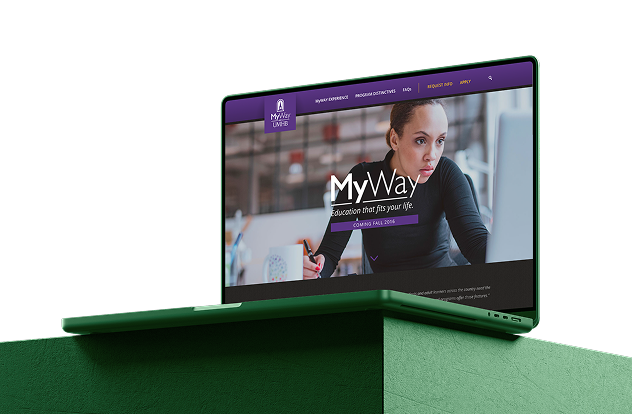
MyWay

A hand-coded and fully customized front-end brings a competency-based education program to life online.
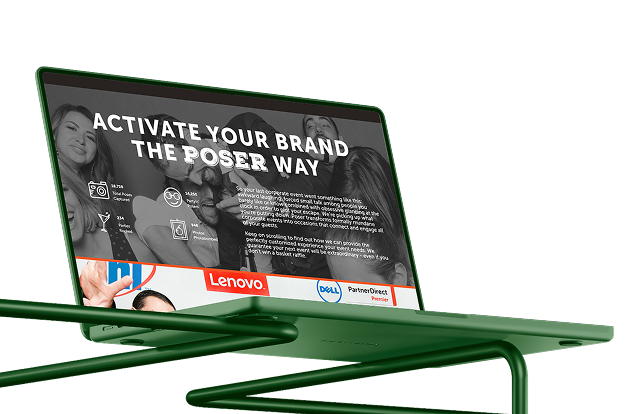
Poser

A custom front-end implementation that blends visual perfection with sharp UX for an event services business.
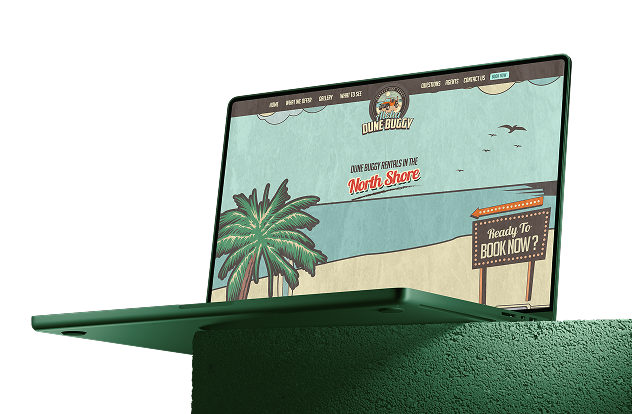
Aloha Dune Buggy

A custom-built website with clean semantics and full responsiveness makes a tourism & leisure experience smooth and intuitive.
TheSiteSlinger did a Rockstar job developing our website. The coding was in perfect harmony. They stayed on schedule, and while keeping their professionalism, they were exciting to work with.

Deanna Herron

I have been impressed with TheSiteSlinger with the projects I have done. I know that I’ll get top-quality coding at an affordable price. I also appreciate how much communication I get. They are an extension of our team!

Bart Caylor

Always a great experience with TheSiteSlinger! These guys know how to code and get things done. I’m continually impressed with the outcome and attention to detail.

Samantha Corcoran

From approved Figma to a live WordPress site that matches it.

Tell us what you’re building. We’ll bring the clean code, the fast site, and the process that keeps it that way.

Share Your Project Needs

    Optional
    0/500
    Optional

    FAQs

    At minimum, an approved design with desktop layouts is enough to start a Figma to WordPress conversion service. Components, defined styles, auto layout, and mobile or tablet frames make the build faster and more precise, but they aren’t strict requirements. If responsive behavior isn’t fully designed, we agree on breakpoint rules during discovery so nothing is guessed later in development. The more structured the file, the fewer decisions get made during the build instead of during design. Sharing edit access to the Figma file, rather than static exports, also speeds up review and QA.

    Pixel accuracy is the standard we build to when providing Figma to WordPress conversion services. Spacing, typography, color values, and component behavior are checked against the original file at every agreed breakpoint before a section is marked complete. If something in the design can’t be implemented exactly as shown, whether due to browser constraints, performance, or accessibility, we flag it during planning so you can make the call early, instead of discovering a mismatch after launch.

    Yes. Rather than converting a Figma file into a set of static pages, we rebuild the underlying components as reusable Gutenberg or ACF blocks. Once the conversion is complete, your marketing or content team can assemble new landing pages, sections, or layouts from those blocks without needing a developer for every change. The structure stays locked to your design system, so new pages built this way remain on-brand automatically. This is usually the difference between a one-time conversion and a design system your team can keep using.

    Yes, within performance budgets. Interactions and micro-animations prototyped in Figma, such as hover states, transitions, and scroll effects, are implemented in the WordPress build where they support the user experience. Before implementation, we review each interaction against Core Web Vitals and accessibility requirements, since some effects that look fine in a prototype can hurt load performance or mobile usability once live. Where that trade-off exists, we’ll flag it and suggest an alternative that keeps the intent of the design without the performance cost.

    Yes, and converting a full design system is where this service delivers the most long-term value. Instead of treating each page as a one-off build, Figma components, variants, and design tokens are mapped to a matching library of WordPress Gutenberg or ACF blocks and theme.json values. Color, spacing, and typography updates made in the design system can then be reflected consistently across the live site, and new pages built from those blocks stay aligned with the design automatically, without a developer rebuilding each one from scratch.

    Small refinements, like copy edits, spacing adjustments, or minor visual tweaks, are absorbed into the normal development workflow as part of Fgma to WordPress conversion services. Larger changes, such as new components, restructured pages, or a different design direction, are scoped and communicated transparently so you can decide whether the timeline impact is worth it before we proceed. Throughout the project, you have staging access to see the build in progress, which makes it easier to catch changes that matter early rather than after a milestone is already complete.

    It depends on the scope of the project within our Figma to WordPress conversion services. A landing page usually takes 2–4 weeks, while a full website typically takes 4–10 weeks. Timing can vary based on the number of templates, component complexity, and whether WooCommerce is included. We confirm the exact timeline after reviewing your Figma files during discovery.

    Yes, white-label Figma to WordPress conversion services for agencies is a regular part of our work. We build client designs exactly as approved, document the code so your team or your client’s future developers can maintain it, and work within your delivery schedule and client communication preferences. Projects are NDA-friendly, and we can operate under your agency’s branding throughout the engagement. This setup works well for agencies that handle design and client relationships in-house but need a dependable WordPress development partner for implementation.
    Back to top